
How do I upgrade SiteDesigner?
The following article explains how to upgrade SiteDesigner. The free version of SiteDesigner you receive with your hosting account allows you to create a basic website with a few features. If you require more functionality for your website, you can choose from one of three upgraded SiteDesigner plans that include many features for dynamic websites:
- SiteDesigner Plus: More page templates, more navigation options, and a blog zone feature
- Business Designer: Access to over 700 templates, more subnavigation options, image editors, and a flash intro wizard
- Shop Designer: All the Business Designer plan features with a product catalogue and payment gateway for ecommerce functionality
Details of each plan can be found here. All upgrades are final. Once you upgrade your account SiteDesigner cannot be downgraded to a lower package.
To upgrade SiteDesigner, please follow these steps:
- Open a browser window and go to www.HostMySite.com
- Click on Control Panel Login.
- Log into the Control Panel as the Account Administrator and select the appropriate domain.
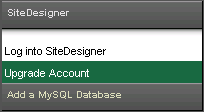
- Click on SiteDesigner and select Upgrade Account.
- Review the plan chart and decide which upgraded plan you want.
- Select the upgraded plan from the dropdown menu.
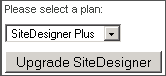
- Click Upgrade SiteDesigner.
Additional Support Topics